Saturday, July 27, 2013

Low-Tech & Mid-Tech Adaptions For Completing Math Assignments

In my last couple blog posts I have been talking about the different Educational Applications that are available to help students who are struggling in mathematics in the classroom. I have discussed the different assistive technology available to help students who are struggling with automaticity/math fluency, visual-spatial or motor control difficulties, and those struggling with math concepts, math skills and problem solving in the classroom. However, what happens to these students when they have to complete a math assignment at home?  That being said, the purpose of this blog post is to let educators and parents know about the low-tech and mid-tech adaptations that are available to help students complete math assignments!

Low-Tech & Mid-Tech Adaptions For Completing Math Assignments:


Low- Tech Options Include:

  1. Math Fact Rubber stamps: These stamps help students master their fundamental math facts using something fun, like stamps. These stamps come in addition facts, subtraction facts, multiplication facts and division facts. These would be fun to use as a review and to help a child complete an assignment! 
    Math Fact Rubber Stamps
  2. A manipulative number line
  3. Laminated addition and multiplication tables 


Mid-Tech Options Include:

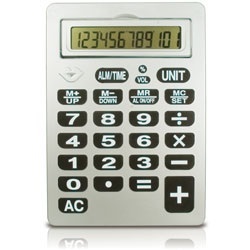
  1. Large Calculator with oversized buttons: These are useful for students who lack motor control.
    Large Calculator with oversized buttons.
  2. Talking Calculators: These are useful because they can "help students with learning disabilities check their work by reading aloud every keystroke that the student enters" (
    Dell, A.G., Newton, D.A., & Petroff, J.G.
    ). This is also useful for students with visual impairments. 
    The See 'N' Solve Talking Calculator
  3. "Coin Abacus": The "coin abacus" "contains keys that are shaped and sized just like real coins; they are designed to teach basic money counting" (
    Dell, A.G., Newton, D.A., & Petroff, J.G.
    ). 
    Coin Abacus
  4. "Coin-U-Lator": Just like the "coin abacus", the "coin-u-lator", "contains keys that are shaped and sized just like real coins; they are designed to teach basic money counting" (
    Dell, A.G., Newton, D.A., & Petroff, J.G.
    ).
    The "Coin-U-Lator"

    To learn more about the Coin-U-Lator, click THIS link! 


    As a student with a math disability, I think I would have, and still would, benefit from using the above low-tech and mid-tech adaptions to help me complete math assignments! As far as young children go, I love the idea of the "coin abacus" and the "Coin-U-Lator" these mid-tech tools not only seem like a lot of fun to play with, but they are also very useful to help reinforce students on how to add or subtract coins! 


    Dell, A.G., Newton, D.A., & Petroff, J.G. (2012). Assistive Technology in the Classroom. Boston. PEARSON.

Educational Applications For Teaching Math Concepts, Skills and Problem Solving

In my last blog I talked about the various educational applications that are available for students with visual-spatial or motor control difficulties and how these applications can help them succeed in math. In this blog post, I am going to be talking about educational applications that can help teach math concepts, math skills and problem solving.  That being said, the purpose of this blog post is to let educators and parents know the numerous amounts of assistive technology (AT) available to help children with math concepts, math skill and problem solving.

Educational Applications For Teaching Math Concepts, Math Skills and Problem Solving:

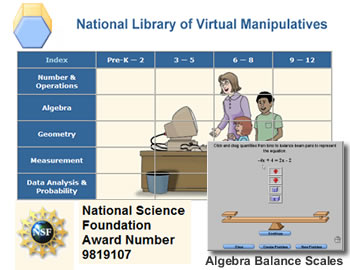
  1. National Library of Virtual Manipulatives maintained by Utah State University: A web site that offers manipulatives for students in grades Pre K-12. Users can navigate the site by the five categories available to them, including; Number & Operations, Algebra, Geometry, Measurement and Data Analysis & Probability.

  2. Illuminations: This web site is meant to help students in grades K-12 improve their math concept skills. Illuminations offers students extended practice with "visual representations of concepts, and/or interactive activities" (
    Dell, A.G., Newton, D.A., & Petroff, J.G. 
    ). 
    Illuminations Website
  3. Computing Technology for Math Excellence: This application provides users with information and Web sites that offer virtual manipulatives. The user then clicks on the link that sounds the best to them and the link brings the user directly to the Web site.

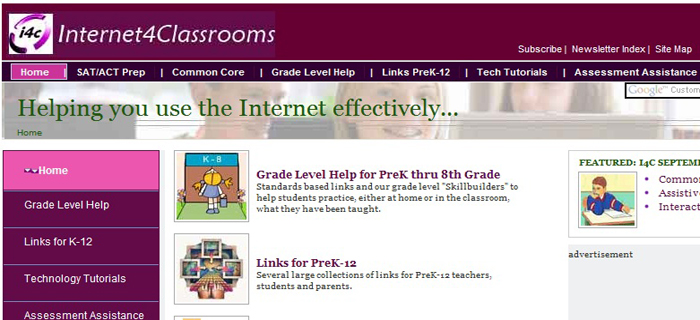
  4. Internet 4 Classrooms: This website is meant to help students in grades Pre K-8 build their math skills. Internet 4 Classrooms is free and intends to help the user find "free internet resources to use in classroom instruction and to reinforce specific subject matter at home" (
    Dell, A.G., Newton, D.A., & Petroff, J.G.).
    Internet 4 Classrooms
  5. Virtual Laboratories in Probability and Statistics: Virtual Laboratories in Probability and Statistics is a resource for advanced students studying probability and statistics. This resource "provides expository text to help students understand the basic theories of probability and statistics" (Dell, A.G., Newton, D.A., & Petroff, J.G.). This resource also provides the user with "interactive means to demonstrate the mathematical theories presented" (Dell, A.G., Newton, D.A., & Petroff, J.G.).
    Probability and Statistics.
  6. Math Playground: Math Playground provides users with free online math activities, such as Math Games, Word Problems and Logic Puzzles, to help enhance a students' math concepts, skills and problem solving! 
    Math Playground
  7. Conceptua Math:This website covers fraction topics taught to students in grades 2-7. The purpose of this website is to enhance who class instruction of fractions! This webite even provides "visual models that are accompanied by spoken text to facilitate independent use by students who are struggling readers" (Dell, A.G., Newton, D.A., & Petroff, J.G.). Additionally, for teachers, this website offers "formative assessments and captures student data, enabling teachers to monitor students' progress and make appropriate instructional decisions" (Dell, A.G., Newton, D.A., & Petroff, J.G.).
    Conceptua Math
  8. Destination Math: Destination Math is a Houghton Mifflin Harcourt product that is targeted to students in grades K-12 to help them develop "math reasoning, conceptual understanding and problem solving" (). Destination Math is not only very engaging but it also provides students with "explicit step-by-step instructions and opportunities to practice problem-solving skills" (Dell, A.G., Newton, D.A., & Petroff, J.G.). Houghton Mifflin Harcourt has additionally come out with a Spanish version of this product, Destino Matematicas, to support any English Language Learners (ELL) in the classroom!


I think that the above resources would all be fantastic for reviewing or practicing skills and also fantastic for an alternate or supplemental learning activity in the classroom! I can say from personal experience that learning math concepts, math skills and problem solving can be extremely difficult for any student, especially a student with a learning disability. I found all the resources to be extremely useful, but the one that impressed me the most was Conceptua Math. Conceptua Math seems like the best resource because it was created with a dual-purpose, to be able to be used in school with the whole and independently as well! Since I'm a strong believer in "practice makes perfect", I believe that if a teacher used this website for a whole class activity and then asked the students to use this same website to help them at home that the student's math concepts, skills and problem solving abilities would improve! I also LOVE that this resource had both struggling readers and ELL students in mind and came up with differentiation to help these users succeed as well! 


Dell, A.G., Newton, D.A., & Petroff, J.G. (2012). Assistive Technology in the Classroom. Boston. PEARSON.

Educational Applications For Visual-Spatial or Motor Control Difficulties

In my last blog post, I talked about four different educational applications that teachers could consider using to help students in their classroom that are struggling with automaticity/ math fluency. In this blog post, I am going to talk about seven different types of education applications and how they can be used to help students with a different type of math disability; students with visual-spatial or motor control difficulties. That being said, the purpose of this blog post is to let educators know what types of assistive technology (AT) are available to help students in their classroom who may be struggling with visual-spatial or motor control difficulties.

 Before we get into the educational applications that are available to help these students succeed in the classroom, some of you may be wondering what visual-spatial or motor control difficulties may look like when it comes to math. Here are some characteristics of students who have visual-spatial or motor control difficulties when it comes to math: 

  • Difficulty writing numbers
  • Difficulty aligning digits in computation problems
  • Difficulty creating visual representation (ex: shapes or angels)
  • Have illegible work
  • May not be able to understand and interpret their own written work
        • (Dell, A.G., Newton, D.A., & Petroff, J.G.).

Educational Applications For Visual-Spatial or Motor Control Difficulties:


  1. MathPad: MathPad is a talking math worksheet that can be used with addition, subtraction, multiplication or division. "Students with fine motor difficulties can demonstrate their skill simply by using the keyboard or clicking the mouse". "MathPad displays just one problem at a time, and the digits that are supposed to be in each place (ex: ones) are properly aligned". Additionally, speech output options can be helpful for students with visual impairments. (Dell, A.G., Newton, D.A., & Petroff, J.G.). 
    MathPad
  2. MathPad Plus:  MathPad Plus is an extended version of MathPad that includes arithmetic computations with fractions and decimals. "Students have the option of viewing the problems represented as pie charts; fraction bars, or decimal grids; these representations can increase the students' understanding, especially those who are visual learners" (Dell, A.G., Newton, D.A., & Petroff, J.G.). 
    MathPad Plus
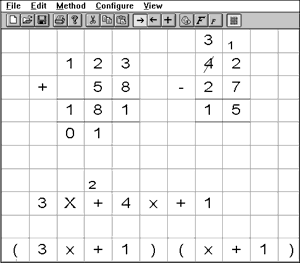
  3. Virtual Pencil (VP) Arithmetic: VP Arithmetic is designed for students who struggle with using a pencil correctly. Using VP Arithmetic students who typically struggle with writing out their math problems are able to solve them in "much the same way they would using pencil and paper, including performing and showing immediate steps" (Dell, A.G., Newton, D.A., & Petroff, J.G.). VP Arithmetic also offers a speech feedback option. "The extensive speech feedback reads problems and provides enough information so students who cannot see the problem can understand the position of digits and can navigate to where they need to be" (Dell, A.G., Newton, D.A., & Petroff, J.G.). A tutorial mode for VP Arithmetic is also available! 
    A Student Using VP Arithmetic
  4. Virtual Pencil (VP) Algebra:  VP Algebra "extends most of the features of VP Arithmetic so students with disabilities can solve algebraic equations" (Dell, A.G., Newton, D.A., & Petroff, J.G.). Just like VP Arithmetic, VP Algebra also has a speech feedback option to help its users who may struggle with reading or sight. Additionally, "students can manipulate complicated equations and can copy and paste portions to be solved separately and then reinsert them into the original equation" (Dell, A.G., Newton, D.A., & Petroff, J.G.).
    VP Algebra
    TO LEARN MORE ABOUT THE VIRTUAL PENCIL CLICK THIS LINK!!!!!!!

  5. Number Navigator: Number Navigator is a low-tech option for students who simply need a "math processor".  This application allows you to enter and solve math problems on a computer, and also allows you to adjust the colors, fonts and font sizes to meet the students needs.
    Number Navigator
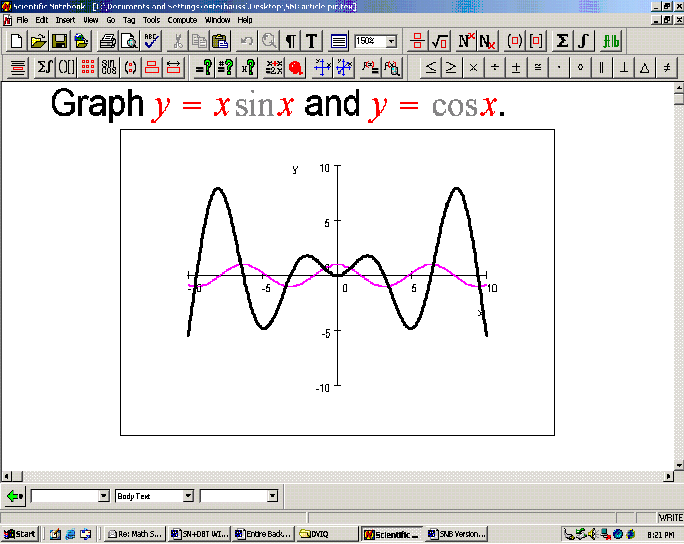
  6. Scientific Notebook: Scientific Notebook was designed to help students be able to solve equations in an advanced math class setting! "Students can work with calculus, transformations, and matrices, among other topics!" (Dell, A.G., Newton, D.A., & Petroff, J.G.). 
    Scientific Notebook
  7. Meanders Annotator: Meanders Annotator was designed to help students with motor control difficulties in geometry as well as an add-on tool that works in Microsoft Office. "When geometry problems are presented in Microsoft Word, Meanders Annotator enables students to draw on diagrams, record legible markings such as congruent angles and parallel lines on geometric figures, and plot line on XY graphs" (Dell, A.G., Newton, D.A., & Petroff, J.G.).
    Meanders Annotator

One of my favorite parts about writing this blog is that I never considered the fact that visual-spatial or motor control difficulties could effect a student's math abilities. It was definitely mind-opening for me to read about how this disability interferes with math and all the different AT applications out there that can help students begin to succeed! One of my favorite applications that I leaned about was the Scientific Notebook. I enjoyed learning about the Scientific Notebook, because it was an AT device to help students in advanced classes! I LOVED reading this because as educators it is important to remember that disabilities come in all shapes and sizes. Just because a student has a disability, it does not mean that they are not capable of participating and succeeding in advanced classes! Having a disability just means that that individual mean need some accommodations in order for them to succeed!!! 


Dell, A.G., Newton, D.A., & Petroff, J.G. (2012). Assistive Technology in the Classroom. Boston. PEARSON.

Applications That Can Be Used For Automaticity/ Math Fact Fluency

In my last blog post I talked about educational applications. I discussed the three key questions that teachers must consider when deciding which educational application is the most appropriate for a student in their room. In this blog post, I am going to discuss the educational applications that a teacher could consider for a student in their room that struggles with automaticity/ math fact fluency. That being said, the purpose of this blog post is to help teachers find an appropriate assistive technology (AT) device for a student in their room who is currently struggling with automaticity/math fact fluency.


Some of you may be asking, what exactly is automaticity in math? Automaticity refers to "the fast, accurate, and effortless processing of content information. Automaticity is also referred to as math fact fluency" (Dell, A.G., Newton, D.A., & Petroff, J.G.).

Applications That Can Be Used For Automaticity/ Math fact Fluency:


  1. FASTT Math (Fluency and Automaticity through Systematic Teaching with Technology; Tom Snyder): FASTT Math "assesses students' command of basic facts by measuring response time and then generates customized activities based on the results."  This application helps students "strengthen their memorization of facts and eliminate the need to rely on counting strategies to solve problems" (Dell, A.G., Newton, D.A., & Petroff, J.G.). 
    FASTT Math
  2. Timez Attack: The Timez Attack application focuses on teaching the child their multiplication facts. Timez Attack is a video game and is so engaging the kids don't even realize they are learning! There is a free Base version of Timez Attack available for download as well as a Full Version that can be purchased. However, the Full Version includes additional games.
    Timez Attack
  3. The ArithmAttack: The ArithimAttack provides students with practice in "basic addition, subtraction, multiplication and division facts.  Customized problem sets are easily generated by setting the highest and lowest numbers to use so students' practice can be targeted to their particular areas of need" (Dell, A.G., Newton, D.A., & Petroff, J.G.) There is a free version of this application that can be played off-line with Microsoft Internet Explorer or played online.
    The ArithmAttack
     
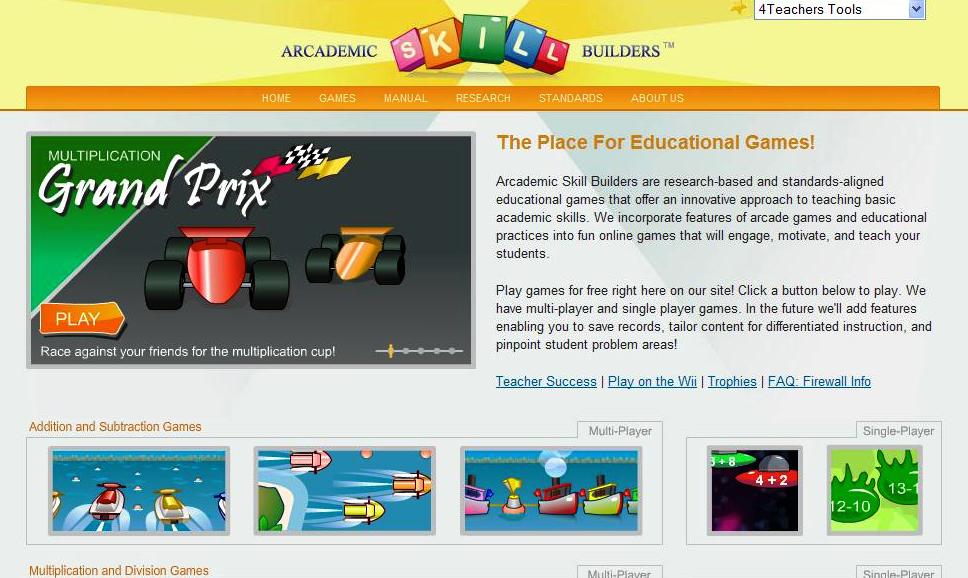
  4. Academic Skill Builder: The Academic Skill Builder application has games to help a child "develop automaticity in addition, subtraction, multiplication, division, integers, fractions and ratios". These games are played online and have multi-player and single-user game options. "For all the games, users can set custom number rangers to provide targeted practice on specific areas of need"(Dell, A.G., Newton, D.A., & Petroff, J.G.).  Additionally, a limited number of keys are required to play this game so that students who have difficulty using a mouse or keyboard won't have any issues playing this game!
    Academic Skill Builder

Since AT devices that would be useful to help students with math disabilities may not be as obvious as the AT devices that are available to help students with reading or writing disabilities, it was extremely helpful, as a future educator, to get some insight into the AT available for students with math disabilities. I especially enjoyed learning about the AT devices out there to help students with their specific math needs, like automaticity/math fact fluency. For me specifically, my problem was always with retaining information. I would learn something one day and then completely forget it then next. To help with my specific needs, I believe that the FASTT Math application would have benefitted me the most. With the help of FASTT Math, I may have been able to strengthen my memorization skills, which would have made my time in math class A LOT easier! 


Below is a short demo of how FASTT Math Works!!!


Dell, A.G., Newton, D.A., & Petroff, J.G. (2012). Assistive Technology in the Classroom. Boston. PEARSON.

Educational Applications

In my last few blog posts, we have been talking about students with reading and writing disabilities. In my blogs, I discussed numerous assistive technology (AT) available to help meet these students specific needs so that they can begin to succeed in the classroom. In this blog post, I am going to discuss a different type of struggling student you may come across in your classroom or at home, a student with a math disability. Through my next couple of blogs, I am going to discuss the many different AT devices that are available for students with a math disability and which devices help specific weak math areas.

The purpose of this blog post is to help educators know what questions to ask when they are selecting educational applications for their students.

"The term educational applications is used in the ensuing discussion to encompass both software programs and interactive Web-based activities" (Dell, A.G., Newton, D.A., & Petroff, J.G.).


Key Questions that should be considered when selecting Educational Applications:

  1.  "What is the intended outcome of the use of the educational application?"  Example: Strengthen problem solving or building speed and accuracy with math facts (Dell, A.G., Newton, D.A., & Petroff, J.G.). 
  2. "Is the educational applications likely to fulfill its stated purpose? (Dell, A.G., Newton, D.A., & Petroff, J.G.). 
  3. Math facts
  4. "Can the educational applications be used as an alternative to traditional classroom activities to enhance students' participation?" (Dell, A.G., Newton, D.A., & Petroff, J.G.). 


As someone who has a math disability myself, I was very interested in this content. Although there was not too much AT around when I was younger, as I read the key questions that teachers should ask, I couldn't help but wonder what my teachers would've chosen for me. I couldn't help but wonder if I could've benefitted from any type of AT. 


Dell, A.G., Newton, D.A., & Petroff, J.G. (2012). Assistive Technology in the Classroom. Boston. PEARSON.


Sunday, July 21, 2013

Assistive Technology For Reading

In my last blog post, I talked about writing disabilities. When a child has a writing disability, even going through the writing process (prewriting, drafting, reviewing, editing, sharing) can be an extremely difficult task. To make writing easier for these students I talked about different assistive technology devices that would help them through each step of the writing process! In this blog post, I am going to be talking about students who have a reading disability. Just like with writing, when a student has a reading disability they will try to avoid reading activities at all cost. To help these students feel less anxiety about reading activities and to help them succeed in reading, I am going to talk about different assistive technology devices to help students with reading disabilities!

The purpose of this blog post is to help educators and parents understand different assistive technology devices that they could consider using to help a child in their life that has a reading disability. Reading is a life-long skill that students need to be able to do on their own and feel confident doing so, with the help of the following assistive technology devices, a child can finally feel confident when given a reading assignment and could complete the assignment independently!


POPULAR ASSISTIVE TECHNOLOGY DEVICES FOR READING DISABILITIES:


1) Text Reader: 

WHAT: A software program that reads all the text in any given document or application.

INCLUDES: Reading the web, study tools and supports for writing.

USED FOR: Students with a reading disability, but with adequate vision.
                             
                                   (Golden,S.)


2) Screen Reader:

Screen Magnification Feature
WHAT: Reads ALL the text elements on the screen, including; menu bars, buttons and dialogue boxes.

INCLUDES: Screen magnification features.

USED FOR: Students with visual impairments or reading disabilities.
                       (Golden,S.)


3) Text-To-Speech:

Text-To-Speech software includes the following features to support reading:
  • Choice of high-quality voices.
  • Modify text interface (how the program reads, or chunks, the text). 
    • Text-To-Speech software can speak by letter, word, speak by sentence, or the program can be set to speak only after a complete paragraph.
  • Ability to control rate (speed up or slow down the speech).
  • Recursive, web-based or built-in dictionary.
  • Text-To-Speech Highlight Feature
    • Built-in are "finite but typically easier to understand" (Golden,S.).
    • Web-based are "essentially infinite but may contain difficult language" (Golden,S.).
    • Recursive allows "users to look up words provided in the definition" (Golden,S.).
  • Highlight and extract key information.
    • "User can select key words or phrases and move them to a different part of the screen or a different document" (Golden,S.).  
  • Ability to insert, create or modify scaffold for reading.
    • "Allows the user or the teacher to guide the reader to relevant or required information within the text" (Golden,S.). 
  • Can read files directly from bookshare.org.
  • Can OCR (Optical Character Recognition) documents.
    • Transforms a picture or text to readable text.
  • Consistent format for Internet and other reading.
  • Converts to MP3.
  • Includes language translator.
              • (Golden,S.)


Where To Get Electronic Text?:


To watch a video about how to find a specific book on bookshare.org, click the link!!!


This blog post relates directly to the classroom. As educators, we come across students with reading disabilities fairly often. My blog post provides educators with some assistive technology devices that are being used to help students with reading disabilities and a brief description of what the devices are and how they can help the student! Of coarse, before deciding to use any of the above assistive technology devices, an IEP team should discuss whether assistive technology is necessary and whether any of the devices would be appropriate to help the child succeed in the classroom! Reading is a valuable, life-long skill! Educators should work overtime to make this skill as easy and stress-free for their students as possible! 


Golden, S. Assistive Technology for Reading. Retrieved from: http://www.gatfl.gatech.edu/tflwiki/images/6/6d/CREATE_webinar_-_AT_for_Reading_Feb_21_2013.pdf


Friday, July 19, 2013

Having A Writing Disability

In my last blog post, I talked about the C-Print. The C-Print is an assistive technology device that helps children who are deaf or hard-of-hearing (sensory disability) be able to communicate. In this blog, I am going to be talking about other assistive technology devices that would be useful for students who have a writing disability. In addition to the new assistive technology devices I will be introducing you to, I will also be mentioning the C-Print, because the C-Print is a great assistive technology device to help students with a writing disability be able to take notes!

The purpose of this blog post is to help educators understand what assistive technology devices are available to help their students with the writing process and what other steps need to be taken to make sure that the assistive technology is being used appropriately and benefiting the child.

One of the main things that students with writing disabilities struggle with is the processes that is involved with writing. Those writing processes include; prewriting, drafting, reviewing, editing and sharing. Since the writing process is difficult for students with writing disabilities, it is not uncommon for them to try to avoid writing all together.


Writing Disabilities In The Classroom
  • Step 1: If you have a student with a writing disability in your classroom it is important to make sure that they get specific instruction on the writing process.
  • Step 2: There is TONS of assistive technology devices out there that can be helpful in each of the  five areas of the writing process.
  • Talking Dictionary
    • Prewriting: An assistive technology device that is helpful for students who struggle with prewriting is using a graphic organizer, like Inspiration.
    • Drafting: Assistive technology devices that are helpful for students who struggle with drafting include; word processing, word prediction with custom dictionaries and speech recognition software.
    • Reviewing: An assistive technology device that is helpful for students who struggle with reviewing is using text-to-speech software.
    • Editing: Assistive technology devices that are helpful for students who are struggling with editing include; text-to-speech, phonetic spellchecks, talking dictionaries, thesaurus, grammar checker, and text correction software.
    • Sharing: Assistive technology devices that are helpful for students who are struggling with sharing include; word processing, multimedia presentation applications, digital storytelling, blogs and wikis. 
      • (Dell, A.G., Newton, D.A, & Petroff, J.G.).
  • Step 3: Train the student(s) on how to use the specific assistive technology tools that would be helpful for them.
  • Step 4: Train the student(s) on how to use the assistive technology tools to "enhance the writing process" (Dell, A.G., Newton, D.A, & Petroff, J.G.). 
  • Step 5: If the student is struggling with taking notes, a teacher should consider using one, or more than one, of the following technology tools to support the students in their room; a portable word processor, SmartPens, Braille note takers, capturing devices, and CART and C-Print services.
    • (Dell, A.G., Newton, D.A, & Petroff, J.G.).

SmartPen


Writing is a life-long skill. You are asked to write using the above writing process in elementary school all the way through college.  Since this is a life-long skill, I think it is very important for teachers to take advantage of assistive technology, especially the low-tech assistive technology devices that almost all classrooms have, to help those students in their room who have writing disabilities. With the help of assistive technology, and making sure that the students are using the devices properly, in a way that would enhance their learning, these students who once avoided writing will be begging to show off their skills!


Dell, A.G., Newton, D.A, & Petroff, J.G. (2012). Assistive Technology in the Classroom. Boston: PEARSON.